 Export a file
In this article:
 Export a range or selection of subtitles
Overview
Wincaps Q4 is an offline creation, preparation and translation system that allows the user to create files from scratch or to import subtitling text from third party file formats. Q4 can also import files created by the Script Extractor system
Wincaps Q4 provides facilities for exporting subtitle files in a variety of different formats, including the basic EBU Subtitle Exchange Format (.STL), used by all common Teletext subtitling packages, and the EBU-TT format. It also supports a number of third party file formats, which are used by other subtitling software developers.
 Whilst every effort is made to maintain support for other subtitling software manufacturers' formats, Broadstream cannot guarantee that such facilities will work for all such formats.
Export a file
Use the following procedure to export the current file to another format. Note that several of the export formats require configuration before use.
 Note that you must have a customer assigned to the file or the export facility will be disabled.
Some file formats (notably the STL/EBU format) contain metadata such as program name, translator name etc. You should enter this information using the GSI pane of the Toolbox before exporting the file, For PAC exports, you can optionally define a custom format for subtitle zero.
Note that exports are disabled in Replay Mode. You should use Edit Mode to export a file.
-
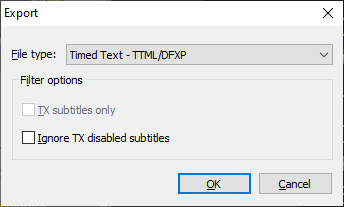
Select File : Export from the main menu. The following dialog is displayed:
-
Choose the desired export format from the drop-down list. The available formats will depend on the personality of the subtitle file being exported, i.e. not all export formats are applicable to all personalities.
-
A standard File Save As dialog is displayed. Choose the name and location for the new file and click on Save to start the export process.
-
Wincaps Q4 displays a progress window during the export process. If Wincaps Q4 detects errors during the export process, a warning dialog will be displayed. This allows you to create a report detailing the errors, the report is saved as a plain text (.txt) file in the same location as the exported file.
-
The exported file is now available in the specified location.
Export a range or selection of subtitles
You can use the Compact View to export just a range or selection of subtitles rather than the entire file. To achieve this, first select the subtitles to export using the Compact View before using the File : Export command described above. If you have a mixed-personality file and you wish to export subtitles from one personality, you can filter the Compact View to display only the Teletext or Open Caption subtitles before making your selection.
Supported export formats
Wincaps Q4 allows you to export subtitles in a wide variety of third-party file formats as detailed in the list below.
Some export formats can be configured to produce variations in the format of the exported files. These configuration settings are stored on a per-customer basis. Click the links in the "configure" column for details.
The "personality" column indicates the type of file personalities (Open Caption/Teletext/Closed Caption) that the export formats were originally intended to support.
Warning: Whilst Wincaps allows you to export files in any personality to any format, exporting a file with a personality other than the specified personality could create an invalid file and cannot be supported.
 Check the reference section for details of how Wincaps Q4 supports the various export formats
|
Format |
Personality |
Configure Export |
Configure Import |
Description |
|
|
|
|
|
|
|
O/T |
|
Cavena/ScanTitling |
||
|
C |
|
|
.CAP (Cheetah) |
|
|
C |
|
|
.CIN |
|
|
C |
DVD Caption (.SCC Sonic Scenarist, Spruce Maestro). SCC only supports NTSC timecodes. Wincaps allows other frame rates to be supported for export although the SCC files created will be invalid. |
|||
|
MCA |
C |
|
.MCA |
|
|
Ultech |
C |
|
.ULT and .ULD (Ultech). |
|
|
Comments |
O/T/C |
|
|
Export all comments to a text file. |
|
Digital Cinema - DLP (Interop) |
O |
|
Interop DCP Specification HTML format based .xml export with separate font file. |
|
| Digital Cinema - DLP SMPTE | O | Yes |
SMPTE 2014 Spec. HTML format based .xml export with option for separate font file. |
|
|
Digital Cinema - DTS |
O/T/C |
|
|
|
|
O |
|
|
.nav, discontinued software tool. |
|
|
T/O |
EBU STL format Specification. This format only supports 25 and 30 fps but Wincaps will allow export to other frame rates, although these may not work with other systems. |
|||
|
NLE (Non LinearEditing) - Adobe Premier EDL |
O/T/C |
|
|
Output is a control file and png images. |
|
NLE - Final Cut Pro (pre-2011) |
O |
|
Output is a control file and tif or png images. |
|
|
ProtoScript Plain |
O/T/C |
|
|
Text with speaker names. |
|
ProtoScript Timed |
O/T/C |
|
|
Text and timecodes with speaker names. |
|
RTF - Rich Text Format |
O/T/C |
|
|
Microsoft proprietary format, no longer supported by Microsoft. |
|
SAMI (Synchronised Accessible Media Interchange) - Formatted file |
O/T/C |
|
Microsoft proprietary format, no longer supported by Microsoft, used for adding synchronised captions or subtitles to video content, such as with Windows Media Player. It is a text-based file with either a .smi or .sami extension that uses an extended version of HTML for formatting. |
|
|
SAMI - Selected Video |
O/T/C |
|
|
|
|
SAMI - Unformatted file |
O/T/C |
|
|
|
|
O/T |
Screen/Broadstream proprietary file. |
|||
|
O/T |
|
|
Unicode version of PAC which uses PAC controls but unicode values for the characters. |
|
|
O/T/C |
|
This is the basic SRT format for use with YouTube and does not contain SubRip features, such as italics. |
||
|
O/T |
|
As SRT but additionally supports colour and style mark ups. |
||
|
O/T/C |
|
|
Wincaps' report that checks for non-standard attributes. |
|
|
Text - Plain |
O/T/C |
Plain text file without timecodes (configurable encoding). |
||
|
Text - Timecoded |
O/T/C |
|
Plain text file with timecodes (configurable encoding) |
|
|
Timed Text - DFXP (Distribution Format Exchange Format) |
O |
|
WC3 Timed Text Markup Language (TTML). |
|
|
Timed Text - EBU-TT |
O/T |
|
EBU Timed Text (EBU-TT) is the successor of the EBU STL subtitling format (TTML). |
|
|
O |
|
Caption Encoder (.USF). |
||
|
O |
|
.vtt, WebVTT was developed from SRT SubRip and has a basic layout similar to the SubRip/SRT layout. |
Note: Compatibility with third party systems using these proprietary file formats can never be 100% guaranteed. In the event of any difficulty please contact the Broadstream support team attaching a copy of the original .W32 file and describing the issue with the target format. Please note also that these file formats provide varying degrees of support for some of the characteristics of the Wincaps format (including comments, GSI and UDA fields for instance and in some cases also font, colour and positioning data).